Pitch & key
How to Change Song Pitch Without Changing Speed
Raising or lowering a song used to mean speeding it up or slowing it down, like a record on the wrong setting. Modern pitch shifting moves the notes and leaves the tempo alone. Here's how to do it well, and how to decide how far to go.
Quick answer
Use a pitch shifter that time-stretches, such as the Key Changer with Keep original tempo ticked. Choose the new key or a number of semitones (each one is about 5.9%), and the song keeps its exact length. Turn on formant preservation for vocals, and stay within about ±4 semitones for the most natural sound.
Why pitch and speed are normally linked
Pitch is how fast a sound vibrates. If you play a recording back faster, every vibration happens sooner, so every note goes up. Play it slower and every note goes down. That's what happens on a turntable at the wrong speed, and it's why an old trick for raising a song's key also made it race along.
Pitch shifting breaks that link. The audio is analysed in many short, overlapping slices. Each slice's frequencies are moved up or down by the amount you ask for, and the slices are put back together at the original timing. The song keeps its length and tempo; only the notes move.
Semitones and cents
A semitone is the step between two neighbouring keys on a piano, black or white. Twelve of them make an octave, which doubles the frequency. So one semitone multiplies every frequency by the twelfth root of two, about 1.0595.
A cent is a hundredth of a semitone. You won't use cents to change key, but they're exactly what you need to fix a recording that's slightly sharp or flat.
| Shift | Frequency ratio | Example | Typical use |
|---|---|---|---|
| +10 cents | × 1.006 | A440 → about 442.5 Hz | Matching a slightly sharp recording |
| +1 semitone | × 1.059 | A → B♭ | A small lift; often enough to make a chorus reachable |
| +2 semitones | × 1.122 | A → B | A common key change for singers |
| −3 semitones | × 0.841 | A → F♯ | Bringing a high song into a lower voice |
| +5 semitones | × 1.335 | A → D | A big change; timbre starts to shift noticeably |
| ±12 semitones | × 2 or × 0.5 | A → A | An octave, same note names |
How far should you shift?
For singers, compare the song's highest and lowest sung notes with the notes you can sing comfortably. The difference in piano keys is the number of semitones to move. Our guide to finding your vocal range and best key walks through that in detail. A quicker method if you don't read music:
- Sing along with the original and note where you strain: the top of the chorus, usually.
- Make a version two semitones lower and try again.
- Still straining? Try one more semitone down. Now the low notes are hard? Go back up one.
- Write the number down next to the song title so you don't have to repeat this.
For instruments, the reasons are different: a guitarist tuned a half-step down can move a recording −1 semitone to play along with standard shapes, and a band rehearsing a song in a different key can move the original recording to match their arrangement.
Step by step in the Key Changer
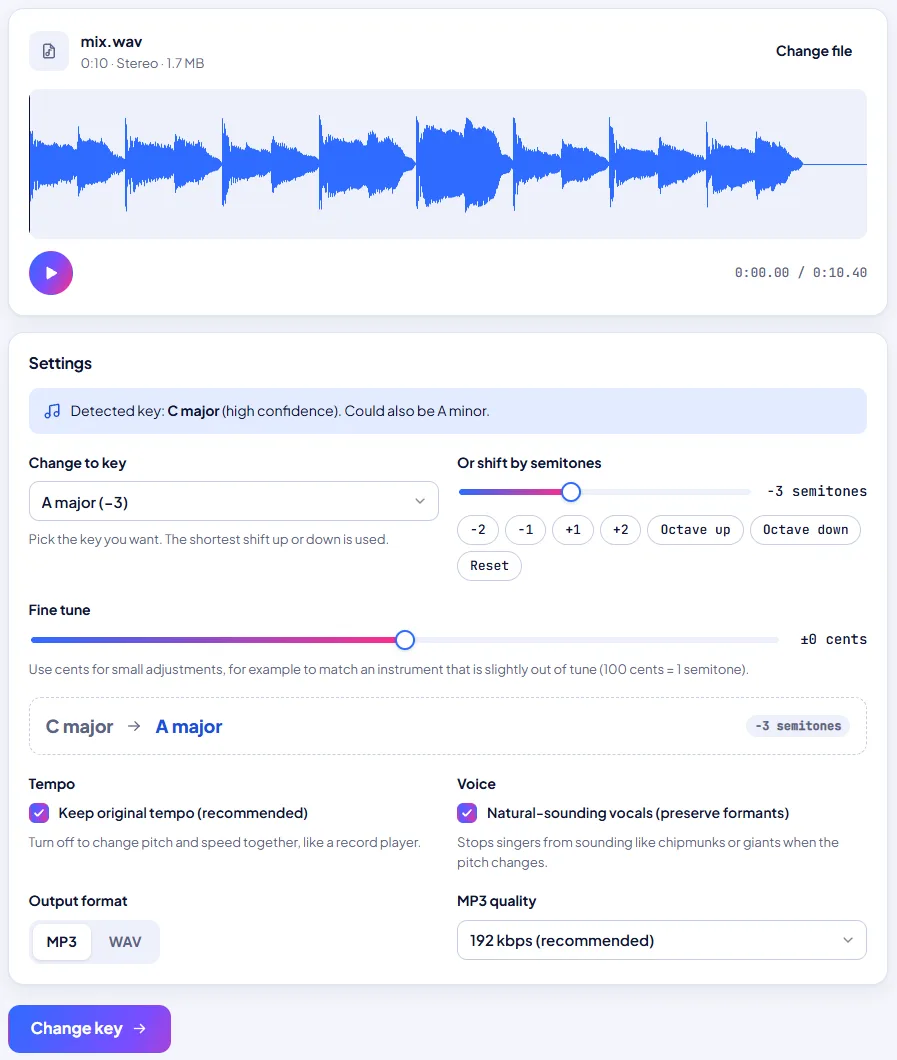
- Open the song in the Key Changer. The tool analyses it and shows the detected key, a confidence level (high, medium or low) and a second possibility, such as "Detected key: G major (high confidence). Could also be E minor."
- Choose how to set the shift. Either pick a target from Change to key, which automatically uses the shortest move up or down, or use Or shift by semitones with the slider and the −2, −1, +1, +2 and octave buttons. The range is one octave either way.
- Leave Keep original tempo ticked so the song stays the same length.
- Decide on Natural-sounding vocals (preserve formants). Keep it on for anything with singing (more on this below).
- Check the summary line, which shows the original key, the new key and the shift, then press Change key.
- Listen to the result in the player, then download it as MP3 or WAV.
The key detector compares how often each of the 12 note names appears across the whole song against standard profiles for all 24 major and minor keys. It's a good starting point, but songs that change key, use unusual harmony or are mostly drums can fool it. If the label looks wrong, ignore it and work in semitones; the shift is applied correctly either way.
Tested: −3 semitones, two ways
Listen
The same 10.4-second synthesised clip. The tempo-kept version stays exactly 10.4 s long; the record-player version stretches to 12.4 s because a −3 semitone change also slows it by about 16%.
Formants: why voices sound like chipmunks
A voice has two layers of pitch information. One is the note being sung. The other is the set of resonances created by the shape of the singer's throat and mouth, called formants, which make a voice sound like a particular person and make an "ee" sound different from an "oo".
Simple pitch shifting moves both together. Shift a voice up a few semitones and the formants rise too, as if the singer's head had shrunk: the "chipmunk" effect. Shift down and they sound unnaturally large. With Natural-sounding vocals on, the Key Changer moves the notes but tries to keep the formants where they were, which keeps a shifted voice much more believable.
For purely instrumental audio, formant handling matters less. If an instrumental sounds slightly dull or coloured after a shift, try rendering it once with the option off and compare.
Fixing tuning with cents
Some recordings aren't at standard pitch. Older recordings may have been made on equipment that ran slightly fast or slow, and some performers deliberately tune to a different reference. If your instrument sounds a little "off" against a track even when you play the right notes, the difference is probably a few cents.
A worked example: a recording tuned to A = 432 Hz sits about 32 cents below the A = 440 Hz standard (1200 × log₂(440 ÷ 432) ≈ 31.8). Setting Fine tune to +32 cents brings it in line with a standard-tuned instrument. If you don't know the reference, adjust in steps of 5 cents and play a sustained note along with the track; the slow "wobble" between the two notes disappears when they match.
Keeping the result clean
- Shift as little as possible. Every algorithm leaves more traces the further it moves the audio. Within about ±4 semitones results are usually hard to tell from the original.
- Start from a good file. Pitch shifting doesn't hide compression artefacts; it tends to emphasise them.
- Shift once. If you need −3 semitones, do it in one pass rather than −1 three times. Each pass adds its own small artefacts.
- For karaoke, separate first, then shift. Remove the vocal from the original recording, then transpose the instrumental. The separation model works best on the untouched mix. Our karaoke guide follows this order.
- Save as WAV if you'll keep editing, so MP3 compression isn't added between steps.
When you want pitch and speed to change together
Sometimes the record-player effect is what you want: "sped up" and "slowed" edits, or matching a DJ deck's pitch fader. Untick Keep original tempo in the Key Changer and a +2 semitone shift also makes the song about 12% faster. To change speed by a specific percentage rather than a musical interval, the Audio Speed Changer is more convenient: untick Keep original pitch there and choose the rate directly.
Troubleshooting
| Problem | Likely cause | Try this |
|---|---|---|
| "Choose a key or a pitch change other than 0…" | The shift is set to zero semitones and zero cents | Pick a different key or move the slider |
| "The key could not be detected." | Very short, silent or percussion-only audio | Shift by semitones instead; detection isn't needed for that |
| Detected key seems wrong | The song modulates, or the detector chose the relative major/minor | Check the "Could also be" suggestion. Relative keys share the same notes, so either works for mixing. |
| Vocals sound hollow or robotic | A large shift, or formant preservation switched off | Turn on Natural-sounding vocals and keep the shift within ±4 semitones if you can |
| Drums sound slightly smeared | A normal side-effect of pitch shifting sharp transients | Use a smaller shift, or accept it for practice tracks |
| Song got faster as well | Keep original tempo is unticked | Tick it and render again |
References
- Signalsmith Stretch: the open-source pitch and time engine the Key Changer uses, including its formant compensation.
- Web Audio API specification, used for decoding and the tape-style rate change.
Frequently asked questions
Can I change the key of a song without changing the tempo?
Yes. That's what the Key Changer does by default. The song keeps its exact length; only the pitch moves.
How many semitones should I lower a song for a male voice singing a female artist's song?
There's no single answer, because voices vary. Many people try a full octave first, because it keeps the melody's relationship to the chords identical, and then adjust by a few semitones. Others find a 4–7 semitone move more comfortable.
Does pitch shifting reduce sound quality?
A little. Small shifts are close to transparent; larger ones can soften transients and change the tone of voices and instruments. Shift once, from the best source you have.
Can it change a song from major to minor?
No. Transposing moves every note by the same interval, so a major song stays major. Changing the mode means changing individual notes, which needs a re-recording or MIDI.
What's the difference between the Key Changer and the Speed Changer?
The Key Changer moves pitch and keeps tempo. The Speed Changer changes tempo and, by default, keeps pitch. Both can also do the old-fashioned "both together" change if you untick their keep option.
Is my song uploaded?
No. Key detection and pitch shifting both run in your browser.